
Causal Loop Diagram Software: A Buyer's Guide for Teams
If you’re searching for causal loop diagram software, you’re probably past the “sticky notes on a wall” stage. You’ve seen how feedback loop mapping can clarify a messy situation, but you need a tool that your team can actually use, maintain, and decide with.
The hard part isn’t drawing loops. The hard part is keeping the model coherent as people add assumptions, new information appears, and priorities change.
This buyer’s guide helps you evaluate causal loop diagram software with a focus on real team usage.
What is causal loop diagram software?
Causal loop diagram software helps you model cause-and-effect relationships and feedback loops so you can understand system behavior over time.
Teams use causal loop diagrams to:
- Make hidden dynamics visible (reinforcing and balancing loops)
- Align stakeholders around a shared model — whether in a company, a government agency, or a research collaboration
- Reduce “fix one thing, break another” surprises
- Choose leverage points for interventions in business, policy, advocacy, or any complex domain
Causal loop diagrams are closely related to system dynamics thinking, but not every team needs full simulation. Many teams just need clear data visualization and the ability to reason together about what their business intelligence dashboards can’t show: the structural dynamics behind the numbers.
Who needs causal loop diagram software (and who doesn’t)
You’ll benefit most if:
- Your outcomes are driven by interconnected causes (not a single bottleneck)
- Different stakeholders — across teams, agencies, or interest groups — disagree on “why this is happening”
- You run repeated initiatives that fail in similar ways
- You need stakeholder alignment, not just reporting
- You work in business, policy, research, or advocacy where the same patterns keep recurring
You may not need dedicated software if:
- You only do occasional one-off diagrams
- You don’t plan to update the model after a workshop
- You mainly need a static illustration for a slide deck
If the model is meant to live and evolve, purpose-built causal loop diagram software becomes worth evaluating.
Causal loop diagram software requirements for real teams
When multiple stakeholders collaborate, the quality of the tool shapes the quality of the thinking.
A practical tool should support:
- Consistent notation (so interpretation stays stable)
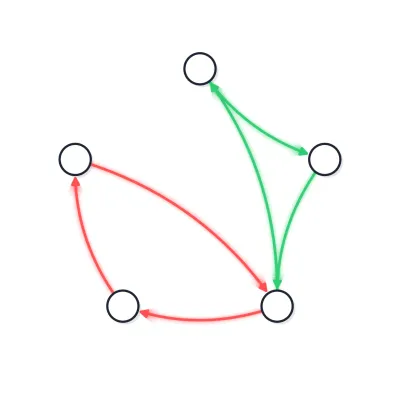
- Loop visibility (so reinforcing loops don’t get missed)
- Context on assumptions (so you can revisit decisions)
- Versioning (so you can explore scenarios)
- Collaboration (so the map doesn’t belong to one person)
If your tool fails in any of these areas, your diagrams will become artifacts instead of living decision tools.
Causal loop diagram software: a buyer’s checklist
Use this checklist to compare tools quickly without getting lost in feature lists.
1) Feedback loop mapping that stays readable
- Can you highlight loops?
- Can you name loops?
- Can you follow a loop without visual clutter?
2) Support for delays and non-obvious effects
- Can you mark delays on relationships?
- Can you capture “this effect shows up later”?
Delays are where most unintended consequences hide.
3) Assumptions attached to the model
- Can you annotate links and variables?
- Can you capture uncertainty or confidence?
A map without assumptions turns into dogma.
4) Collaboration built for stakeholder alignment
- Can multiple people contribute without overwriting each other?
- Are comments and discussion tied to specific parts of the map?
- Can you control permissions?
5) Scenario exploration and what-if analysis
- Can you duplicate a model for scenarios?
- Can you compare baseline vs intervention?
- Can you keep scenario changes separate without rebuilding?
Even without full simulation, this supports better decisions.
6) Governance and maintainability
- Is there version history?
- Can you see what changed and why?
- Can you roll back changes?
This matters when leadership asks, “How did we end up with this conclusion?“
7) Export and sharing for real workflows
- Can you share with non-technical stakeholders?
- Can you present without losing readability?
The model only matters if it can travel through the organization.
Shortlisting causal loop diagram software: 3 decision questions
Do you need simulation or mainly clarity and alignment? Some teams require system dynamics simulation (stocks, flows, equations). Many teams mainly need clear visual modeling to align and decide. Be honest about your actual use case today.
Is the map a one-time deliverable or a living asset? If you won’t update it, you can choose simpler software. If you will update it, prioritize collaboration, versioning, and loop visibility.
Do you want help turning diagrams into actions? Some tools are great for drawing but weak at decision-making. Others focus on moving from insights to experiments. If your goal is faster decisions, choose software that supports decision mapping and scenario planning.
A practical evaluation exercise (use one real problem)
Before committing to any causal loop diagram software, run this test with your team:
1) Pick one recurring problem Example: “support backlog,” “late deliveries,” “churn after onboarding,” “policy that keeps getting circumvented,” “advocacy win that eroded.”
2) Build a first-pass diagram 10–15 variables, 20–30 relationships.
3) Identify loops At least one reinforcing loop and one balancing loop.
4) Capture assumptions Add notes to your 5 most important links.
5) Propose one intervention and model the side effects Does the tool help you see what might break?
If the tool makes this exercise hard, it will be hard in real life too.
Where Holist-IQ can fit
If you want causal loop diagram software that emphasizes whole-picture decisions, you’ll likely prefer tools that make feedback loops easy to model and discuss, then help you translate that model into a clearer action plan.
Holist-IQ is one option that can support this style of work, especially if your team wants to go beyond traditional analytics and reason about interconnected causes and leverage points instead of debating isolated symptoms.
If you’re already leaning toward Holist-IQ specifically, the next step is understanding how it works and how to get value quickly.
Written by
Holist-IQ Team
Helping teams see the whole picture through systems thinking and feedback loop mapping.
Related Articles
You might also be interested in these articles